A power outage is far less stressful when you’ve prepared in advance rather than scrambling once the lights go out. This guide walks through exactly how to set up your home and your solar generator ahead of time, so that when an outage happens, you already know what to do.
Step 1: Identify Your Essential Circuits Before an Outage Happens
Don’t wait until the power is out to figure out what you actually need to keep running. Sit down in advance and identify your genuine essentials:
- Refrigerator and/or freezer
- Medical equipment (CPAP machines, oxygen concentrators, etc.)
- A reasonable amount of lighting
- WiFi router (especially important if you work from home or need connectivity for emergency updates)
- Phone and device charging
Resist the urge to plan around “everything” — trying to power your entire home with a portable power station typically isn’t realistic for most households, and having a clear, prioritized list helps you make fast decisions once an outage actually starts. For a detailed wattage calculation of your specific devices, see our complete wattage guide.
Step 2: Choose the Right Capacity for Your Household
Once you know your essential circuits, match your power station’s capacity to realistic outage duration for your area:
| Typical outage duration in your area | Recommended capacity |
|---|---|
| Occasional, usually a few hours | 300–600Wh |
| Several hours to a full day, a few times a year | 1,000Wh |
| Multi-day outages (storms, hurricanes) | 2,000Wh+, ideally with solar panels |
| Frequent extended outages | 3,000Wh+, expandable, with solar |
If you’re unsure how long outages typically last in your area, check with your local utility provider or look at historical outage data for your region — many utilities publish this information publicly.
Step 3: Keep Your Power Station Charged and Ready
A power station that’s sitting at 20% charge when an outage hits isn’t much help. Build a simple habit around maintenance:
- Check your power station’s charge level monthly, and top it off if it’s dropped below 80%
- If a storm or severe weather is forecast, charge to 100% as soon as you get advance notice
- Follow the manufacturer’s storage guidelines — most recommend keeping a unit at 50-70% charge if it will sit unused for extended periods, with a top-off every few months (see our full guide on battery lifespan and storage)
Step 4: Set Up Solar Charging in Advance, Not During an Emergency
If you own solar panels for your power station, don’t wait until the power is already out to figure out how they connect. Before an outage:
- Test your solar panel setup at least once to confirm it charges properly and you understand the connection process
- Identify a safe, sun-exposed location near your home where you can position panels during daylight hours
- Keep panels stored somewhere accessible, not buried in a garage behind other gear
Step 5: Plan Your Refrigerator Strategy
Refrigerators are one of the most common priorities during outages, and a little planning meaningfully extends how long your food stays safe:
- Keep your refrigerator and freezer as full as possible before an anticipated outage — a full freezer holds cold significantly longer than an empty one
- Group food into a smaller section of the fridge if possible, and minimize door openings during the outage
- Consider a separate small cooler with ice for frequently accessed items, reserving the refrigerator itself for less frequent access
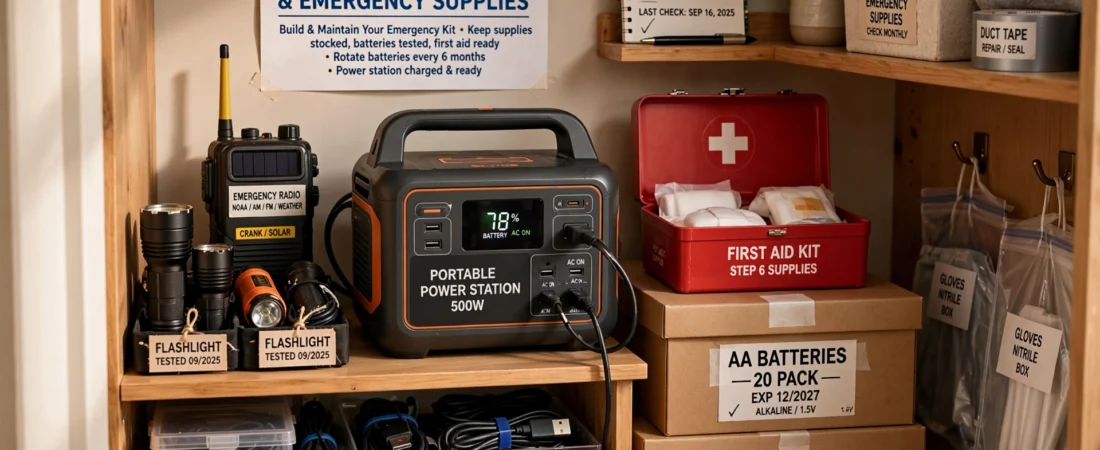
Step 6: Prepare a Dedicated “Outage Station” at Home
Rather than scrambling to find your power station, cables, and flashlights during an actual outage, designate a specific spot in your home where all of this equipment lives together:
- Power station, fully charged or on a regular charge schedule
- Necessary charging cables and adapters
- Flashlights or battery-powered lighting
- A list of your prioritized essential devices (from Step 1), so you’re not making decisions under stress
Step 7: Know Your Power Station’s Limits Before You Need Them
Test your setup under normal conditions, not for the first time during an actual outage. Try running your refrigerator, a few lights, and your router simultaneously for an hour or two to get a real sense of your unit’s runtime and behavior — this is far more useful than relying on spec-sheet estimates alone.
Step 8: Create a Family Communication Plan
A power outage often means limited communication options. Before an outage:
- Ensure all family members know how to charge phones from the power station (or from a smaller, dedicated USB battery bank to preserve the power station’s capacity for larger needs)
- Identify a backup communication method if cell towers are affected in your area (a battery or hand-crank radio, for example)
- Keep a physical, written list of emergency contacts, since phones may eventually run low on charge
A Simple Pre-Outage Checklist
- Power station charged to at least 80%, or 100% if severe weather is forecast
- Solar panels tested and accessible
- Essential circuits/devices identified and prioritized in advance
- Refrigerator and freezer topped off with food/ice before an anticipated outage
- Charging cables, flashlights, and other equipment gathered in one accessible location
- Family members know the plan for phone charging and communication
Frequently Asked Questions
How often should I test my power station to make sure it still works? A quick functional test every few months — charging it and running a device briefly — is a reasonable habit that catches problems before an actual emergency, rather than discovering an issue when you need the unit most.
Should I run my power station continuously during an outage, or only when needed? Running it only for genuinely needed circuits (rather than continuously powering non-essential devices) extends your available runtime significantly. Turn off or unplug devices you’re not actively using, even if the power station could technically handle them.
What’s the biggest mistake people make in power outage preparation? The most common mistake is not testing the setup in advance — many people discover during an actual outage that they don’t know how to connect their solar panel, that their power station wasn’t fully charged, or that a specific appliance draws more power than expected. A single test run under normal conditions solves all three of these issues in advance.
Is a solar generator enough, or should I also have a traditional backup plan? For most households, a well-sized solar generator covers essential circuits effectively for typical outages. For areas with frequent, extended outages, many households also keep supplemental options (a gas generator, or an expandable power station system) — this guide’s Step 2 capacity table can help you gauge whether your current setup matches your area’s typical outage patterns.
Final Thoughts
The households that handle power outages calmly aren’t the ones with the most expensive equipment — they’re the ones who prepared in advance. A properly sized power station, tested solar setup, a clear list of priorities, and a designated spot for your gear turns a stressful, unpredictable situation into a manageable one.
Ready to choose the right power station for your household’s specific needs? Check out our complete guide to the best portable power stations to find the right capacity and features for your situation.
This guide is for general informational purposes. For severe weather events, always follow official guidance from local emergency management authorities and utility providers.